AI WhatsApp Chatbot for Insurance Agents: from lead to consultation on WhatsApp.
SetterMaxer messages every new lead on WhatsApp within seconds, whether it's a bought lead, a comparison site enquiry or a website form. The AI clarifies the key facts, answers simple questions from your documents and books the consultation into your calendar. You give the advice.
What does an AI WhatsApp chatbot for insurance agents do?
An AI WhatsApp chatbot for insurance agents messages new leads on WhatsApp within minutes, so you don't have to chase them by phone. It clarifies job, needs and timeframe, answers simple questions from your documents and books the consultation straight into your calendar. Health questions, comparing policies and recommendations stay with you. It works for independent brokers, tied agents and multi-tied agents alike.
HHartley & Shaw Insurance Brokers Digital assistant · replies around the clockExample
First message · 1 minute after the lead arrived
Good evening Ms Collins, thank you for your enquiry about income protection insurance! I'm the digital assistant of Hartley & Shaw. May I ask you two quick questions so James can prepare your consultation?
Voice note from the prospect
▶
0:18
Understands the voice note
Thank you! As an employed physiotherapist you're in good hands with James. By when would you like to have cover in place?
Prospect
Ideally within this quarter.
✓Criteria metEmployed · Cover within 3 months · Wants advice
Offers a consultation
James will go through the health questions with you personally. He's free for a video call on Tuesday at 6:00 pm or Thursday at 12:30 pm. Which suits you better?
Prospect
Tuesday at 6. Do I need to prepare anything?
Answers from your documents
Please have any existing policies to hand. The invitation with the video link is on its way by email.
Consultation bookedTue, 6:00 pm · Invitation with video link by email
AI is typing
From bought lead to consultation
An agent's day
Leads cost money. So do the ones you never reach.
Bought leads and comparison site enquiries often go to several agents at once. Whoever makes real contact first usually gets the consultation.
01 / Reachability
Three call attempts, three voicemails.
Many prospects don't pick up during the day, least of all for unknown numbers. A WhatsApp message gets read whenever it suits them.
02 / Speed
The lead arrives at 9 pm, you call the next morning.
By then another agent has often called already. The moment when the enquiry was fresh has passed.
03 / Time
Chasing leads eats into advice time.
Calling, voicemail, call-back, finding a slot. Hours you're missing for advice and existing clients.
04 / Book of business
Old leads and existing clients go quiet.
Someone who asked about income protection a year ago never hears from you again, even though their situation may have changed.
Comparison
Calling leads back or AI on WhatsApp?
The AI chatbot doesn't replace your consultation, it replaces the work of getting there. Here's how it compares with calling leads back yourself.
Criterion
Calling leads back
AI chatbot on WhatsApp
Response time
Whenever you have a gap between appointments.
Messages new leads within seconds to minutes, evenings and weekends included.
Reachability
Only if the prospect happens to pick up.
The prospect replies when it suits them, by text or voice note.
Key facts
On the phone, often in a hurry and without notes.
Checks your criteria the same way in every conversation and records each one with a quote from the chat.
Scheduling
Several attempts until a slot works.
Offers free slots from your calendar and books right in the chat.
Follow-up
Gets lost in the day-to-day.
Follow-ups by your rules and reminders before the appointment.
Cost
Your time or an assistant's hours.
Fixed monthly price from €49, no commission.
You can take over any conversation at any time: as soon as you write in the chat, the AI pauses.
Features
What the AI chatbot does for your agency.
SetterMaxer runs on the official WhatsApp Business API and handles every conversation by your script: friendly, fast and within your rules.
Messages leads in seconds
Bought leads, comparison site enquiries and forms get a personal WhatsApp message right away. Around the clock.
Clarifies the key facts
You decide what needs to be clear before the appointment, such as job, needs or timeframe. Only then does the AI offer a consultation.
Books consultations
Appointments go straight into Google Calendar or Calendly, only in free slots. With Google Calendar the video link is added automatically.
Sends reminders
Before the consultation a reminder goes out on WhatsApp, for example 24 and 2 hours ahead.
Answers simple questions
From your knowledge base the AI answers questions about the process, documents or opening hours. No policy recommendations. Standard plan and up.
Understands voice notes
Many prospects prefer to explain their situation in a voice note. The AI understands it and replies in the chat.
Follows up automatically
Anyone who doesn't reply or book gets a follow-up by your rules: as fixed text or written by the AI.
Hands over with a summary
Before the consultation you see the chat and the criteria that were checked. AI summary and lead score come with the Standard plan and up.
Lead sources
Wherever the lead comes from, the conversation starts on WhatsApp.
Agents get enquiries from many channels. This is how they reach your AI chatbot.
Standard and up
Bought leads by email
Forward your lead vendor's emails to your agent's email inbox. The AI reads the name and phone number and messages the lead.
Each line needs different facts. You decide what the AI asks and what stays in the consultation.
Health
Private health insurance
Clarify employment status and reason for the enquiry. The AI asks no health questions, they belong in the consultation.
Income
Income protection
Ask about job, training and timeframe and book the appointment. You do the underwriting conversation.
Pensions
Pensions and retirement
Clarify goal and timing and arrange a consultation, without recommending products in the chat.
Car & home
Car, home and liability insurance
Clarify the wish to switch and the renewal date. The AI answers simple questions about the process and documents from your documents.
Business
Business insurance
Clarify industry, company size and contact person before the meeting is in the calendar.
How it works
Three steps to an AI chatbot for your agency.
You need a WhatsApp number, your calendar and your rules for the conversation.
01Step 1
Set the script, rules and criteria
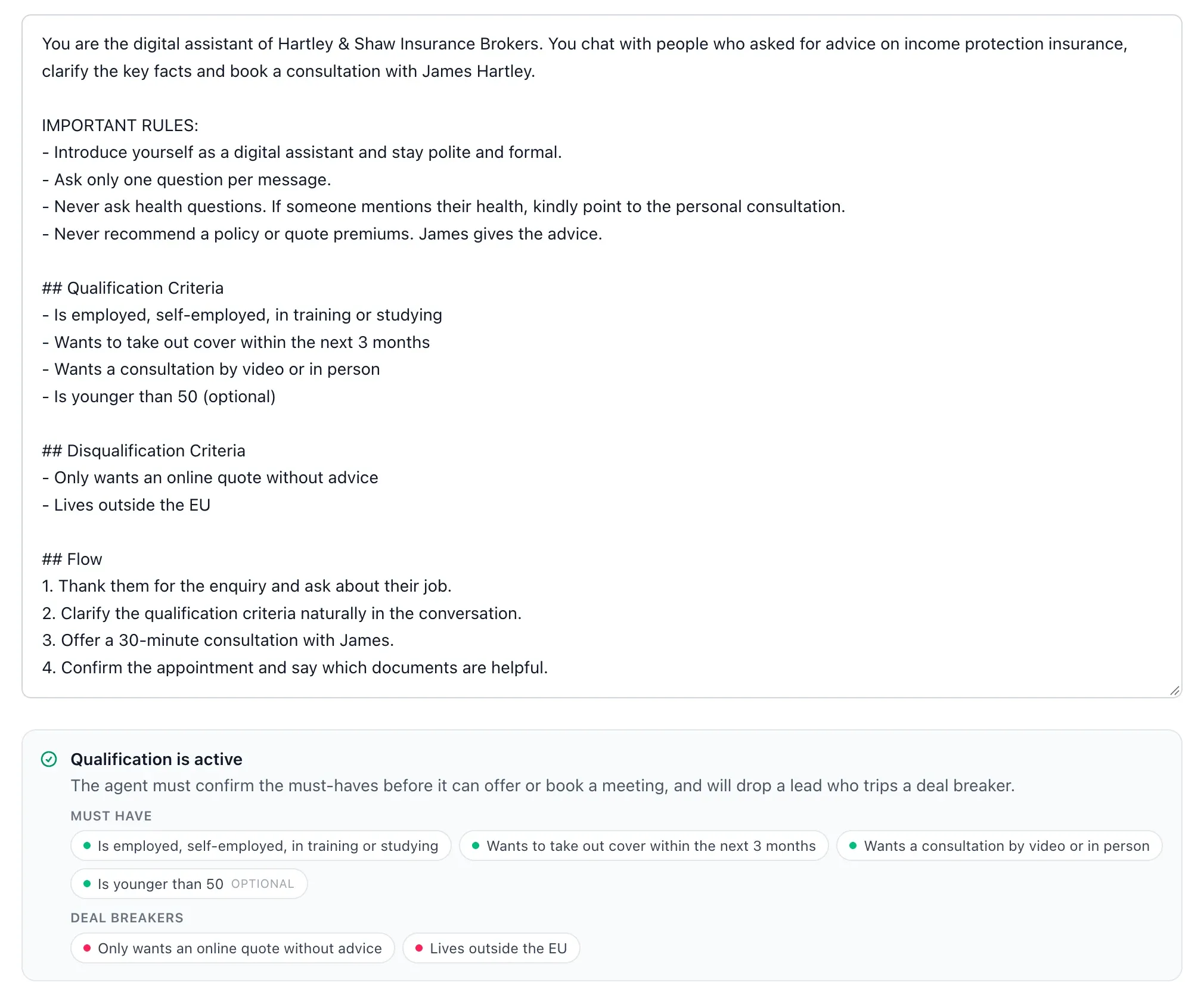
In the prompt configuration, describe how the AI should write and what it must not do: no health questions, no policy recommendations. Under "Qualification Criteria" and "Disqualification Criteria" you define who gets a consultation.
Prompt configuration: rules such as "no health questions" and your criteria.
02Step 2Standard and up
Forward lead emails
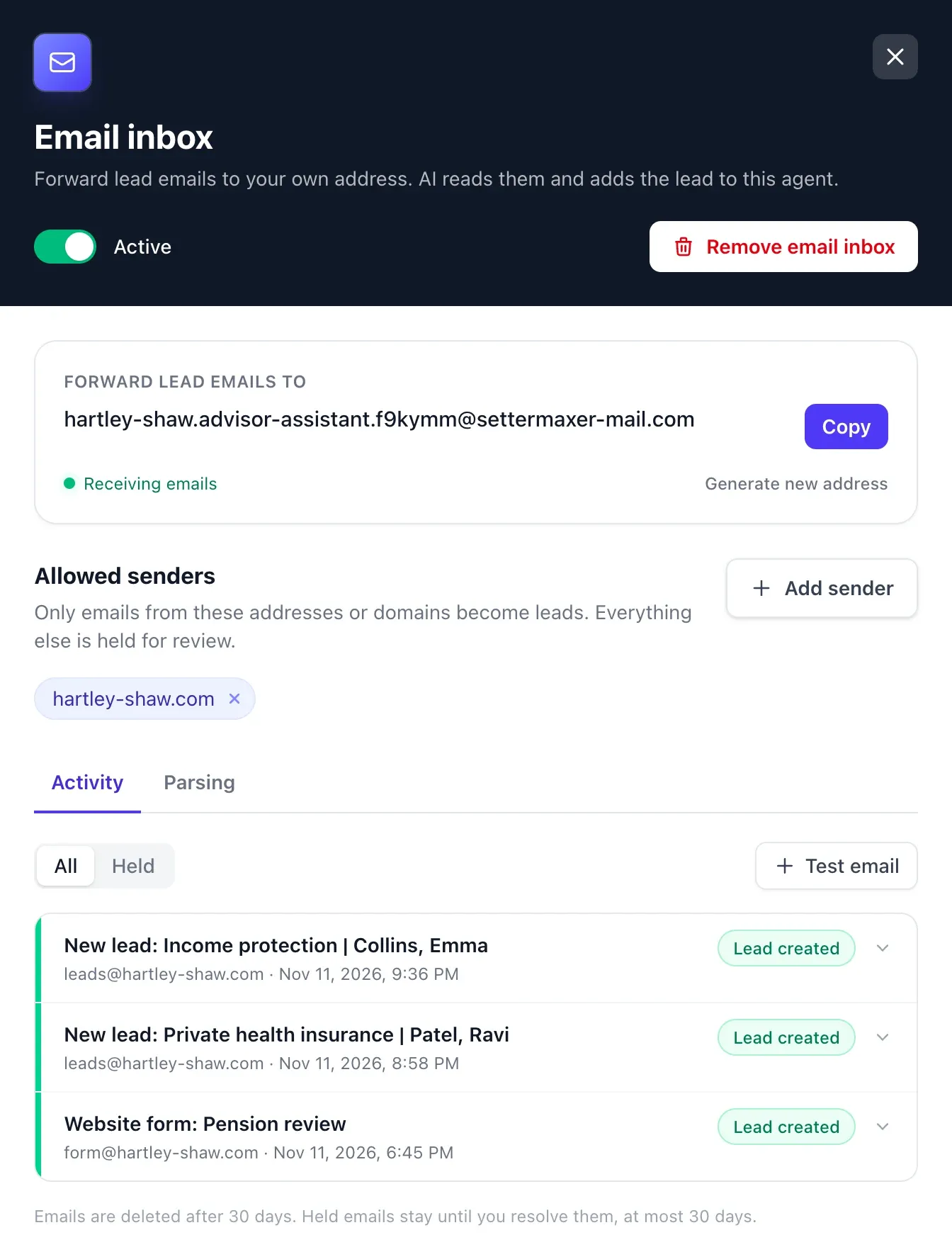
Your agent gets its own email address. Forward bought leads, comparison site enquiries and form notifications to it. The AI reads the contact details, creates the lead and messages it on WhatsApp.
Email inbox: forward lead emails, the AI creates the lead.
03Step 3
Walk into the consultation prepared
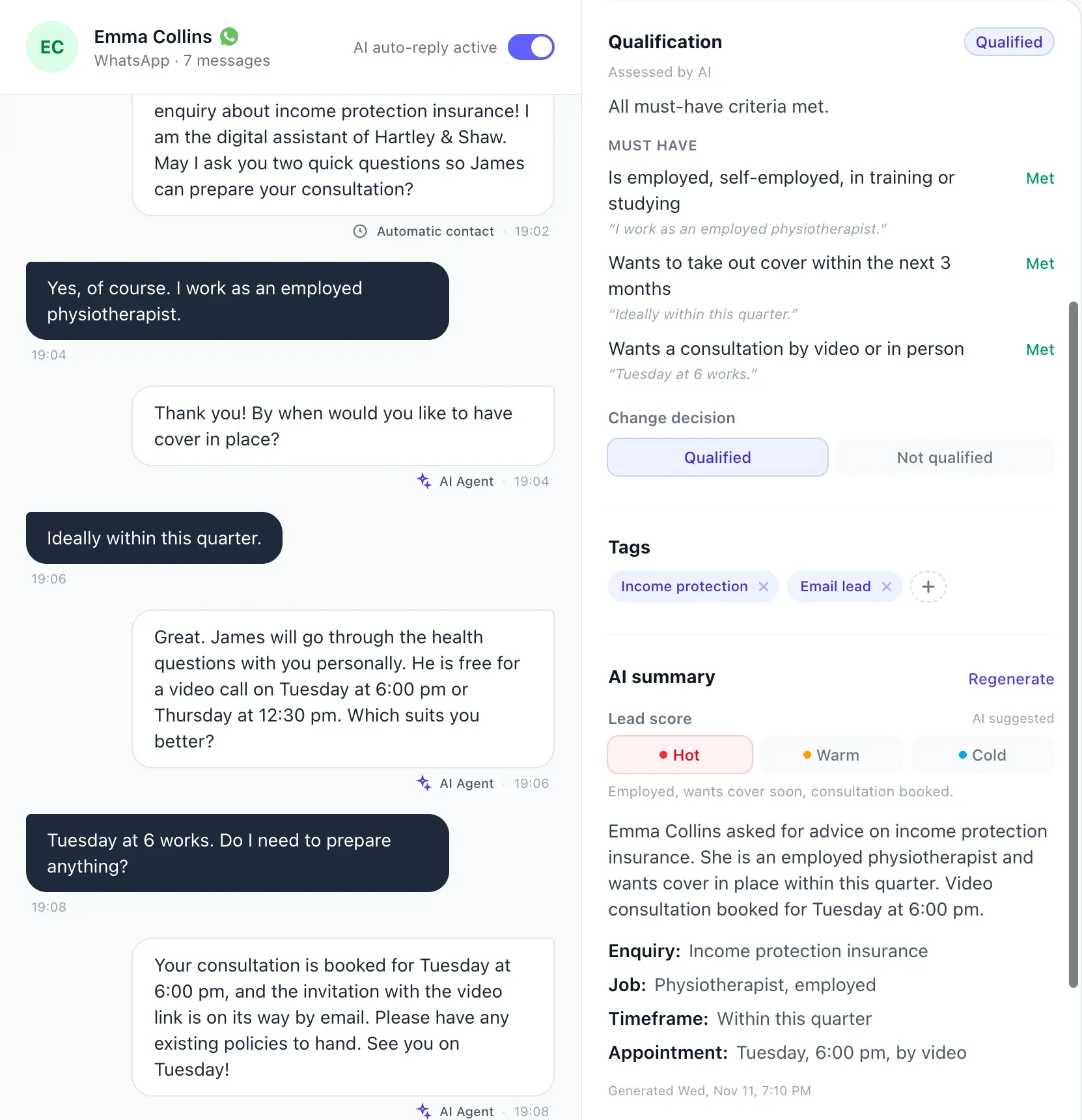
In the conversation you see the whole chat, the booked appointment and which criteria were met. The Standard plan and up add an AI summary and lead score.
Each criterion with a quote from the chat
Summary with enquiry, job and appointment
You can take over at any time
app.settermaxer.com
Conversation: met criteria, AI summary and lead score.
Done for you
We set up your AI chatbot for you.
From the Standard plan we handle onboarding: we go through your lines and lead sources, write the script with your rules and test the conversations with you before the first lead comes in.
Before a contract is concluded, the distributor has to establish the customer's demands and needs. The AI prepares the consultation, it doesn't replace it.
The EU AI Act requires that people are told when they interact directly with an AI system. In the example, the AI introduces itself as a digital assistant.
These notes are not legal advice, and national rules can add to them. Check how they apply to your agency with your legal or data protection adviser.
Pricing
How much does an AI WhatsApp chatbot for insurance agents cost?
You can try SetterMaxer free with 10 leads. Qualification, booking, reminders and follow-ups are included in every plan. For agents who buy leads we recommend the Standard plan, which adds the email inbox, Zapier, knowledge base, lead scoring and onboarding.
Hobby
€49/ month
50 leads per month
For agents starting with a WhatsApp link, website chat and existing clients.
Standard
Most popular
€199/ month
250 leads per month
For agents with bought leads, comparison site enquiries and Meta Lead Ads.
Pro
€499/ month
750 leads per month
For agencies with several advisers and three WhatsApp numbers.
All prices exclude VAT. Pay yearly and get two months free. Compare all plans →
● System answers
Questions from insurance agents.
What agents and brokers most often want to know before they start.
What does an AI WhatsApp chatbot for insurance agents do?+
It messages new leads on WhatsApp within minutes, checks your criteria, answers simple questions from your documents and books the consultation into your calendar. Before the appointment it sends a reminder automatically.
Does the AI give advice or recommend policies?+
No. You set in the script that the AI never recommends policies or quotes premiums. It prepares the consultation, you give the advice.
Does it work with bought leads and comparison sites?+
Yes, if the leads arrive by email. You forward them to your agent's email inbox, the AI reads the name and phone number and messages the lead on WhatsApp. The email inbox is included from the Standard plan.
Only if you allow it, and we advise against that. Set the script so the AI asks no health questions and points to the consultation. If someone volunteers health details, they still appear in the chat history.
Is an AI chatbot on WhatsApp GDPR compliant?+
SetterMaxer uses Meta's official WhatsApp Business API, is hosted in Frankfurt am Main, and you get a data processing agreement (DPA). Whether you may message a lead on WhatsApp depends on their consent; check that with your data protection adviser.
View the DPA →Can I message existing clients and old leads?+
A WhatsApp campaign reaches contacts from a CSV file. Only message contacts who agreed to be contacted on WhatsApp.
Yes. The chatbot works with your script, your calendar and your lead sources, whether you're an independent broker, a tied agent or a multi-tied agent.
Does it work with my agency management system or CRM?+
SetterMaxer connects to other systems through Zapier and webhooks. Whether and how that works with your system is best discussed in the demo.
Yes, we recommend it. In the example the AI introduces itself as a digital assistant, and you decide in the script what it calls itself. The EU AI Act also requires transparency when people interact directly with an AI.
Can I take over a conversation myself?+
Yes, at any time. As soon as you or someone from your agency writes in the chat, the AI pauses automatically.
How much does an AI WhatsApp chatbot for insurance agents cost?+
You start free with 10 leads. The paid plans have a fixed monthly price with no commission per appointment or sale, and differ mainly in the number of new leads per month and the integrations.
You can connect your existing WhatsApp Business number or rent a number from SetterMaxer for €15 per number per month on any plan. A rented number is connected to WhatsApp in a few minutes, no SIM card needed.
From the Standard plan we handle onboarding with you: we write the script with your rules, connect WhatsApp, calendar and lead sources and test the conversations before you go live.
We use cookies for analytics and marketing.We use cookies to improve our website and measure our marketing. You can decline without losing any functionality. Privacy Policy

 Try the AI WhatsApp chatbot live