- Name
- Emily Carter
- Phone
- 07700 900123
- emily.carter@example.co.uk
- Interest
- Solar panels with battery storage
- Message
- Semi-detached house with a south-facing roof, please send a quote.
 SetterMaxer AI
Guide · Email to WhatsApp
Message email leads on WhatsApp automatically.
Enquiries from contact forms, lead portals and CRM notifications often sit in your inbox for hours. Here's how to forward them to SetterMaxer: the AI reads the name and phone number, messages the lead on WhatsApp within minutes and books the appointment straight into your calendar.
Every hour in the inbox costs you appointments.
Lead response time is the time between an enquiry arriving and the first contact. For enquiries that arrive by email it is often far too long: the email gets buried in day-to-day work, the callback reaches nobody, and the prospect has already asked the next provider.
From email to appointment, without lifting a finger.
You forward lead emails to a dedicated SetterMaxer address. The AI reads the key details and creates the lead. After the delay you choose, the lead gets a personal WhatsApp message, and the AI agent carries the conversation through to a booked appointment.
- Email arrives
- AI reads it
- WhatsApp after 5 min
- Appointment booked
- Name
- Emily Carter
- Phone
- +44 7700 900123Country code added
- emily.carter@example.co.uk
Lead created · tag “Email lead”
5 minutes after the email
Hi Emily, thanks for your enquiry with Sunworks Solar! May I ask you two quick questions about your roof so we can send you the right quote?
Sure, go ahead!
Home survey bookedThu, 4:00 pm · straight into your calendar
Every enquiry that arrives by email becomes a WhatsApp conversation.
The inbox works with any email that names a prospect with a phone number. The format doesn't matter: the AI learns from your examples where each detail is.
Your leads don't arrive by email but from Facebook Lead Ads or a CRM with an API? Then connect them via Zapier or webhooks. Guide: Zapier integration
Message email leads on WhatsApp: how to set it up.
You need an AI agent with a connected WhatsApp number and a WhatsApp template approved by Meta for the first message. Setup takes about 15 minutes.
-
Turn on the email inbox and copy the address
In your agent, open Integrations, then Automations, and turn on the Email inbox. Every agent gets its own address. Under Allowed senders, enter the addresses or domains whose emails may become leads.
- Forward with a Gmail filter or an Outlook rule
- Allowed senders: single addresses or whole domains
- Emails from other senders are held for review
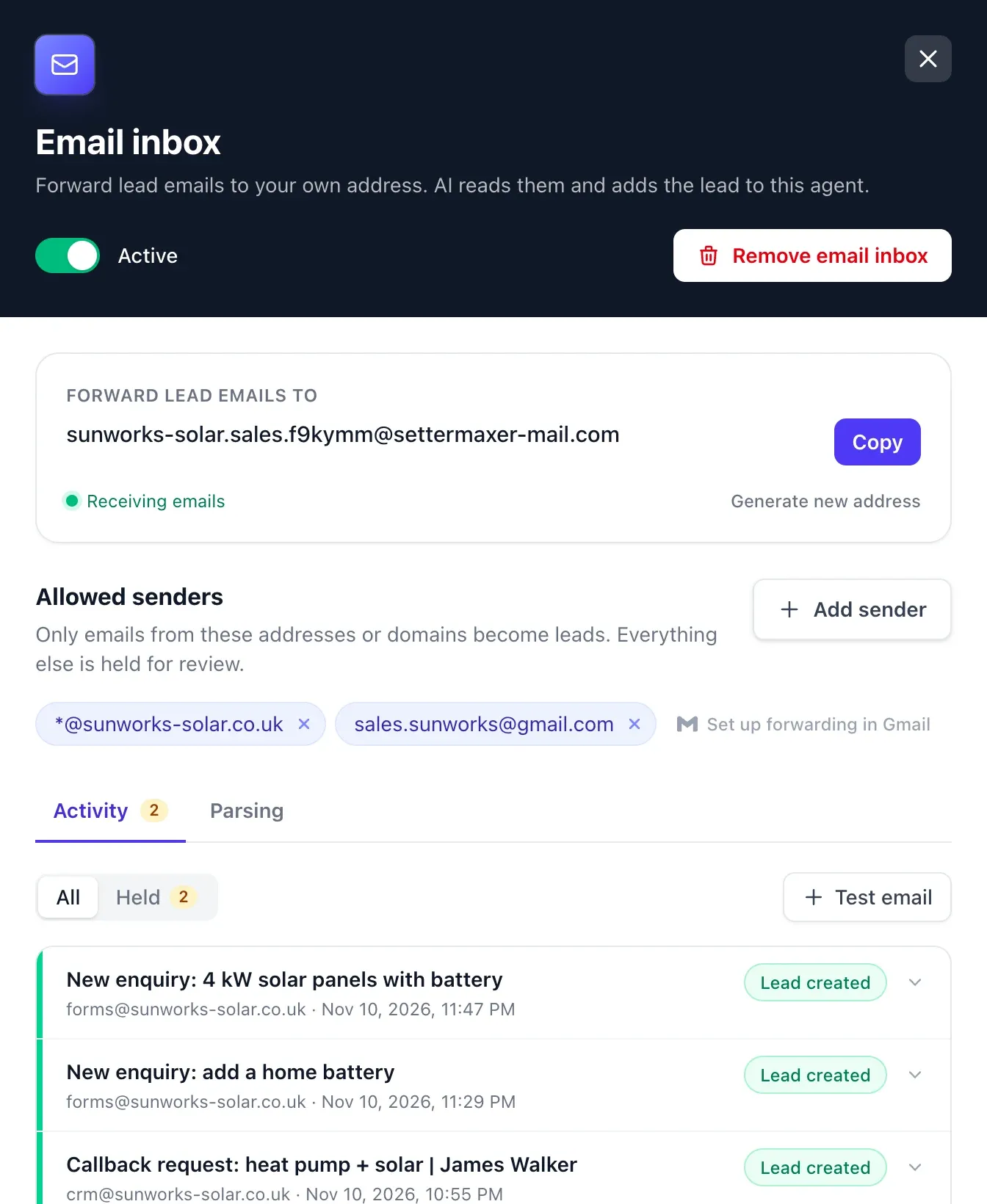
Email inbox: copy the address and approve senders. -
Show the AI where everything is
On the Parsing tab you choose which details the AI takes over. With up to five example emails you show it where the name, phone number and email appear in your notifications. Extra rules handle special cases, such as which person is the lead.
- Phone number is always required, other fields are up to you
- Up to 5 confirmed example emails
- Country code added to numbers without +44
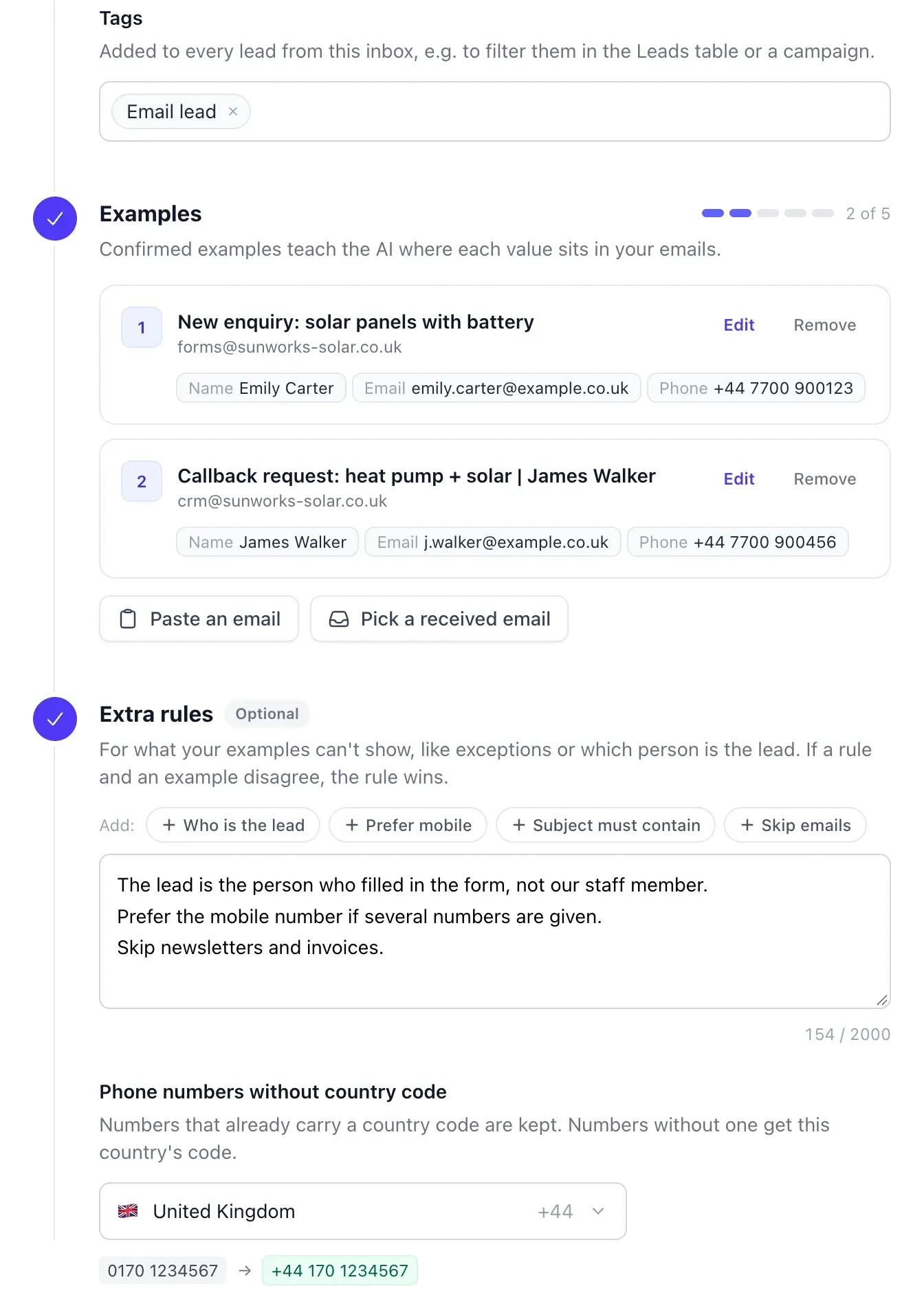
Parsing: examples, rules and country code.
Live
The result: every email becomes an appointment
Turn on Automatic Contact under Outbound and every enquiry runs on its own: the email arrives, the AI creates the lead, and a few minutes later the WhatsApp conversation starts. The AI agent answers questions, qualifies the lead and books the appointment into your calendar.
- First message via an approved template
- Qualification and booking in the chat
- Take over yourself at any time
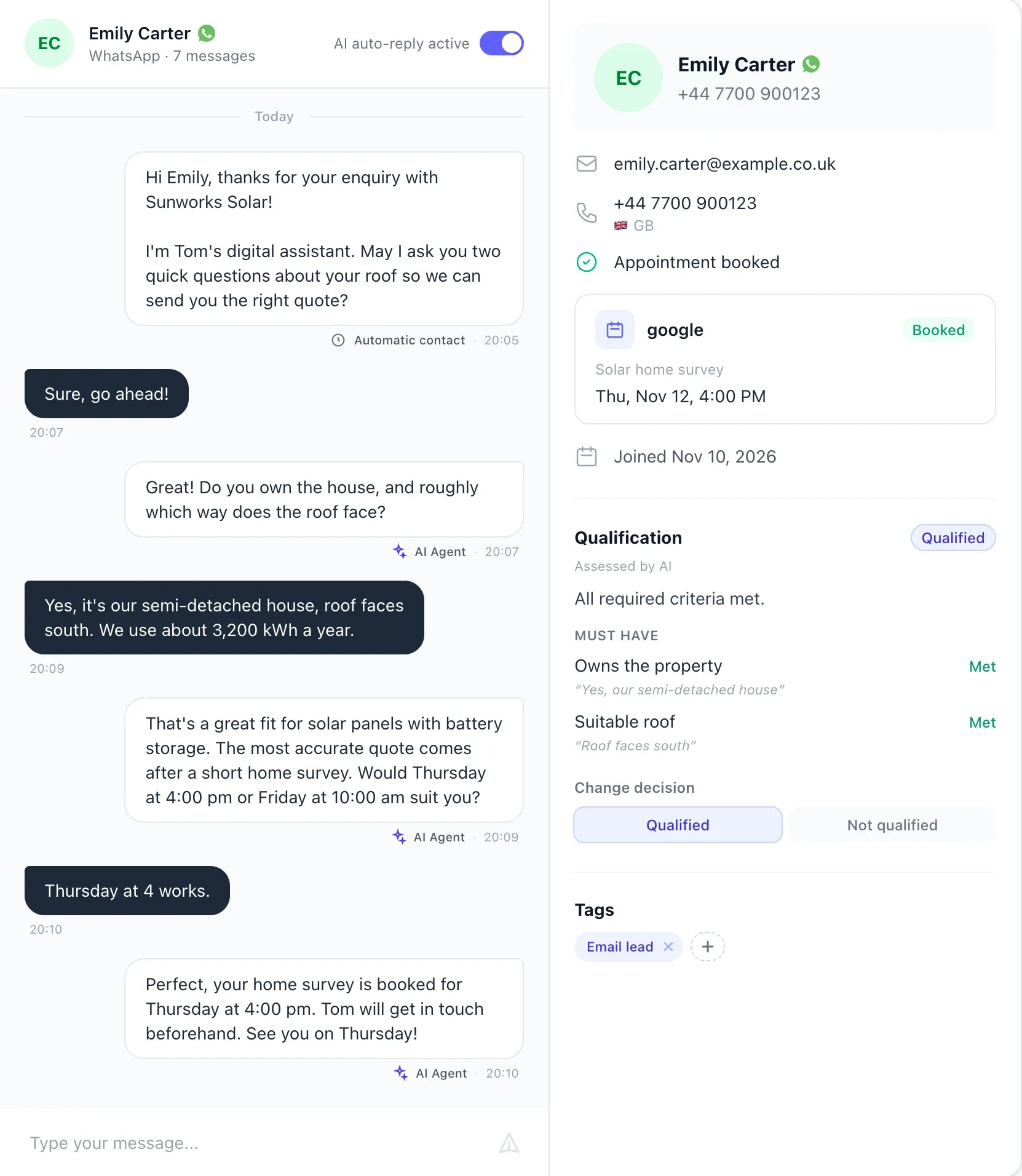
● System answers
Frequently asked questions about email leads and WhatsApp
Everything you need to know about forwarding, parsing and Automatic Contact.
How do I message email leads on WhatsApp automatically?+
Forward your lead emails to your SetterMaxer agent's own address. The AI reads the name, phone number and email and creates the lead. After the delay you set, Automatic Contact sends an approved WhatsApp template. When the lead replies, the AI agent takes the conversation through to the appointment.
Can I just forward emails to WhatsApp?+
Not directly. To turn an email into a WhatsApp conversation you need a step in between that reads the phone number and sends the first message through the WhatsApp Business API. That's exactly what SetterMaxer's email inbox does together with Automatic Contact.
What is speed to lead?+
Speed to lead describes how quickly a business responds to a new enquiry. According to a Harvard Business Review study, the average response time to online enquiries was 42 hours. Companies that responded within an hour were nearly seven times as likely to qualify the lead.
Which emails become leads?+
Any email from an allowed sender that names a prospect with a phone number, such as form notifications, enquiries from lead portals or CRM notifications. The AI recognises newsletters, invoices and other emails without a lead and holds them back.
What happens if the email has no phone number?+
SetterMaxer doesn't create a lead. It holds the email with the reason “no phone number” and notifies you. You can review it, adjust the settings and have the email processed again.
Will a lead be messaged more than once?+
No. Automatic Contact messages each phone number only once per agent, ever. If the same person sends another enquiry by email, SetterMaxer updates the existing lead without sending a second message. Leads who have already written to you themselves aren't messaged either.
How much does it cost?+
The email inbox is included from the Standard plan, Automatic Contact on every plan. Each lead counts towards your monthly lead allowance. Meta also charges a fee for the first template message, which varies by country.
Is it GDPR compliant?+
SetterMaxer uses the official WhatsApp Business API, is hosted in Frankfurt am Main, and you get a data processing agreement (DPA). Forwarded emails are deleted after 30 days. Whether you may message leads on WhatsApp depends on your form and the consent you collect; check this with your data protection adviser.
Who sets it up?+
You can set everything up yourself in about 15 minutes. From the Standard plan we help you with onboarding: we set up the inbox, forwarding, template and AI agent together with you.
Book a demo → Inbound and outbound coverage is ready
No more enquiries left sitting in the inbox.
See in a free demo how SetterMaxer messages your email leads on WhatsApp within minutes, qualifies them and books appointments into your calendar.