Skip to content
SetterMaxer AI
EN DE
Book a free demo
Guide · Lead reactivation

Reactivate old leads with WhatsApp and AI.

Your CRM holds hundreds of contacts who were interested in you once. Here's how to win them back with a WhatsApp campaign: an AI agent runs every conversation, qualifies each lead and books appointments straight into your calendar.

The problem

Full lead lists, empty calendars.

Old website inquiries, trade show contacts, webinar sign-ups: every one of these leads cost you money and showed interest at some point. Yet most of them sit untouched in your CRM, because nobody has time to follow up with all of them.

  • / 01

    Leads never get contacted

    In the day-to-day rush, older contacts slip through the cracks. Anyone who doesn't buy right away ends up on a list nobody opens again.

    23% of companies never responded to online inquiries at all Source

  • / 02

    Mass emails fizzle out

    A newsletter to the whole list is sent in minutes, but it lands between ads and invoices. Few people click, and a real conversation almost never happens.

    2.62% average click rate for marketing emails Source

  • / 03

    Calling everyone doesn't pay off

    Working through hundreds of numbers by phone takes days. Many people don't pick up, and meanwhile your team is missing the leads that are hot right now.

The solution

WhatsApp campaign plus AI agent: conversations, not mass emails.

The easiest way to reactivate old leads is a WhatsApp campaign where an AI agent takes over every conversation. WhatsApp is where your leads are already chatting every day. A short, personal message gets read and answered there, not swiped away.

  1. Send a personal template

    The WhatsApp Business API lets you reach out to contacts first, using a template approved by Meta and each lead's first name.

  2. The AI agent takes over

    When a lead replies, your AI sales assistant answers instantly, around the clock and in your tone of voice.

  3. Warm up and qualify leads

    The agent answers questions, asks your qualifying questions and works out who is genuinely interested.

  4. Book the appointment

    If the lead is a fit, the agent suggests open slots and puts the appointment straight into your calendar. AI appointment setting without the back-and-forth.

Learn more about the AI WhatsApp chatbot
Northgate EstatesAI agent active Example conversation
  1. WhatsApp template Hi Emily, last year you asked us about a valuation of your property. Prices in your area have moved quite a bit since then. Would you like a free, up-to-date estimate?
  2. Oh, yes please! We're actually thinking about selling next year.
  3. AI agent Great! So the estimate is accurate: is it an apartment or a house, and which part of town is it in?
  4. A 2-bedroom apartment near the old town.
  5. AI agent Thanks! The most accurate option is a short on-site valuation, free and about 45 minutes. Would Thursday at 10:00 AM or Friday at 2:30 PM work for you?
  6. Friday at 2:30 works.
Appointment bookedFri, 2:30 PM · On-site valuation
Step by step

Reactivate leads with SetterMaxer: here's how.

SetterMaxer built campaigns for exactly this use case: WhatsApp automation that works through your list while you take care of the booked appointments. All you need is a list of names and phone numbers. A guided setup walks you through it in a few minutes.

  1. Step 1

    Import your leads from a CSV

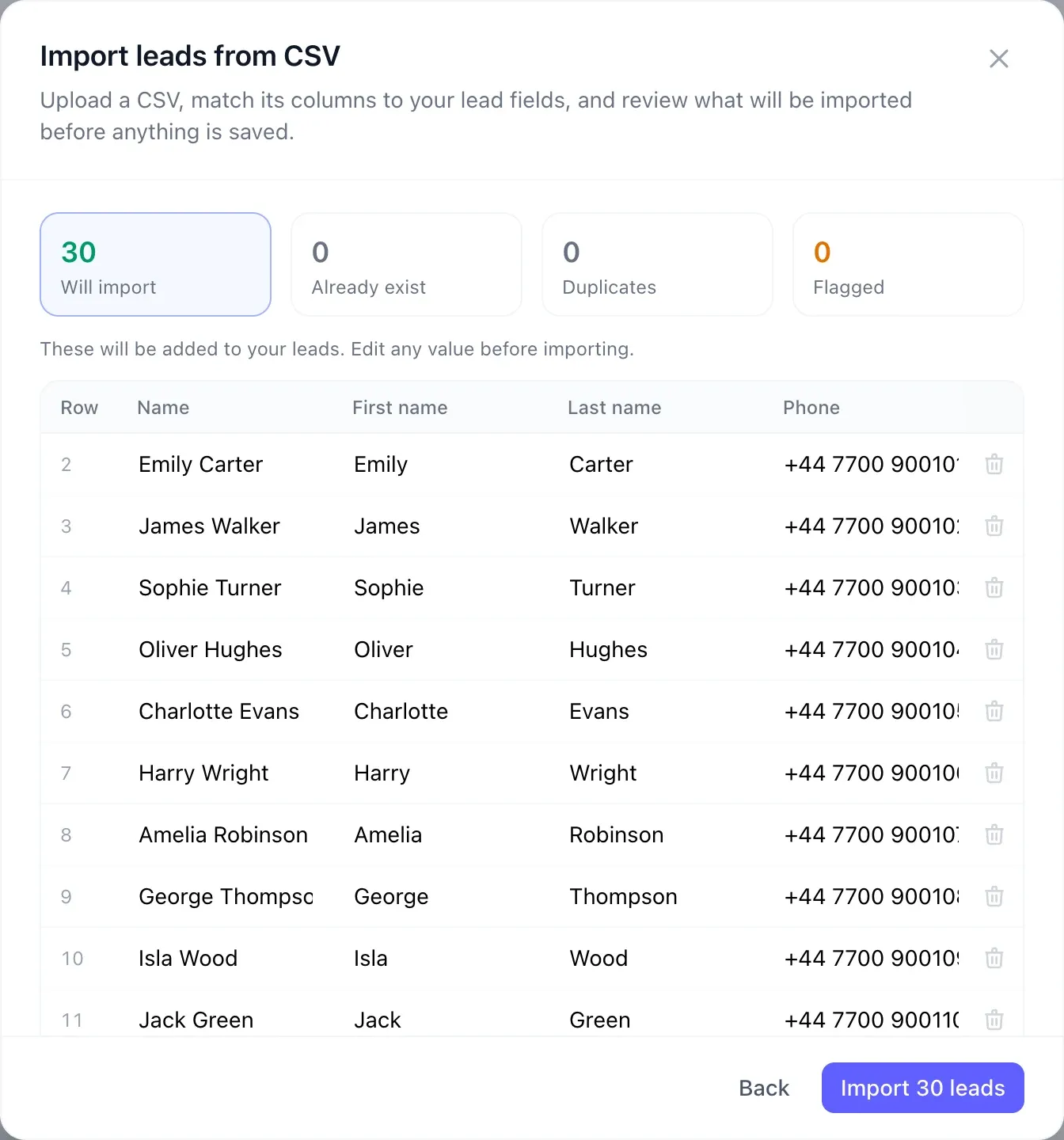
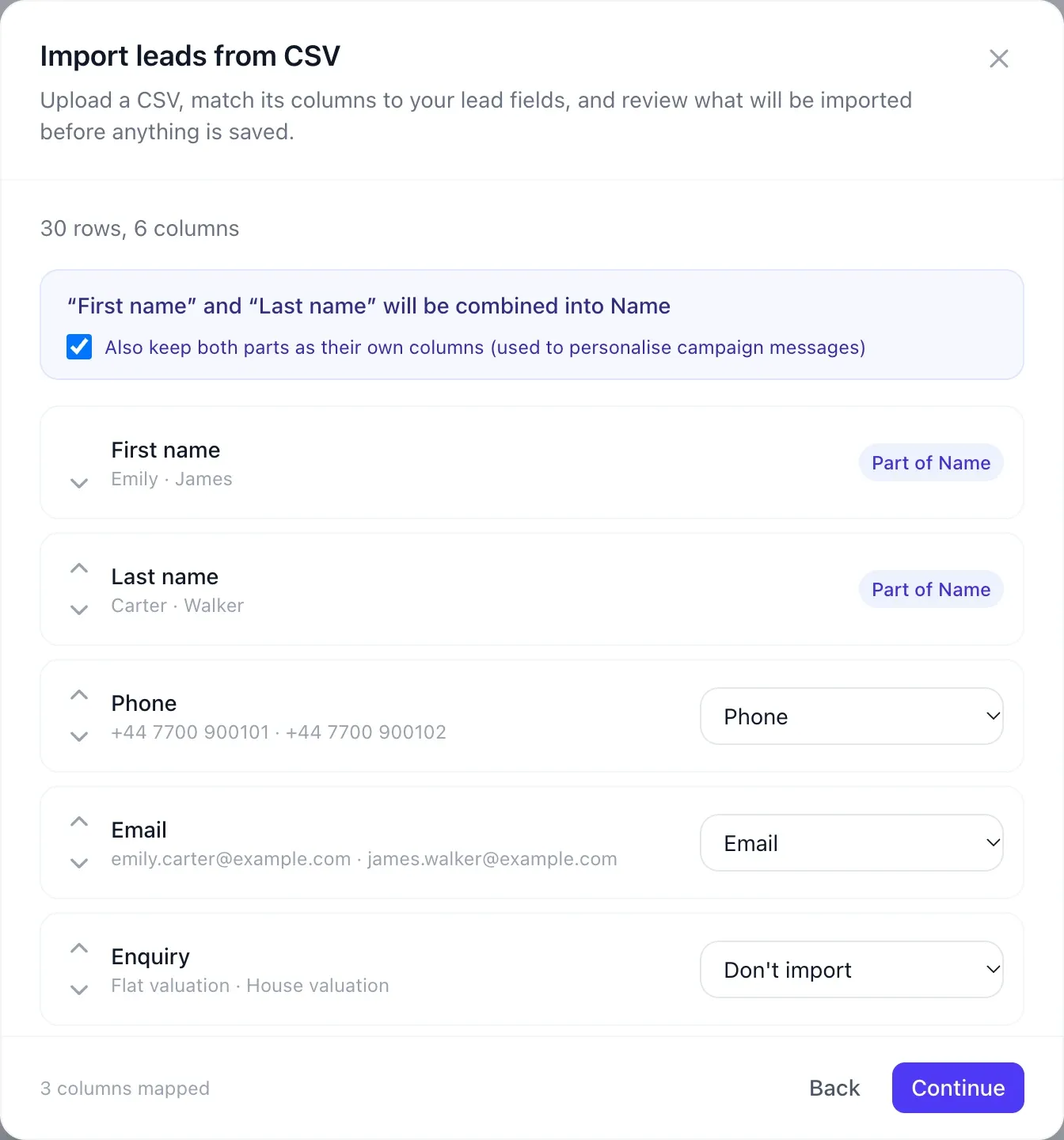
    Export your contacts from your CRM, Excel or Google Sheets and upload the file under Leads. SetterMaxer recognizes the columns automatically and combines first and last names.

    • Up to 1,000 contacts per file
    • Preview before saving: new, already in SetterMaxer, duplicates
    • Every import gets a tag, so you can find the list again later
    SetterMaxer CSV import: columns such as first name, last name, phone and email are matched to lead fields
    Match columns: first and last names are detected automatically.
    Preview of the CSV import with 30 new leads and no duplicates, before saving
    Review: you see exactly what will be imported.
  2. Step 2

    Create a new campaign and choose your leads

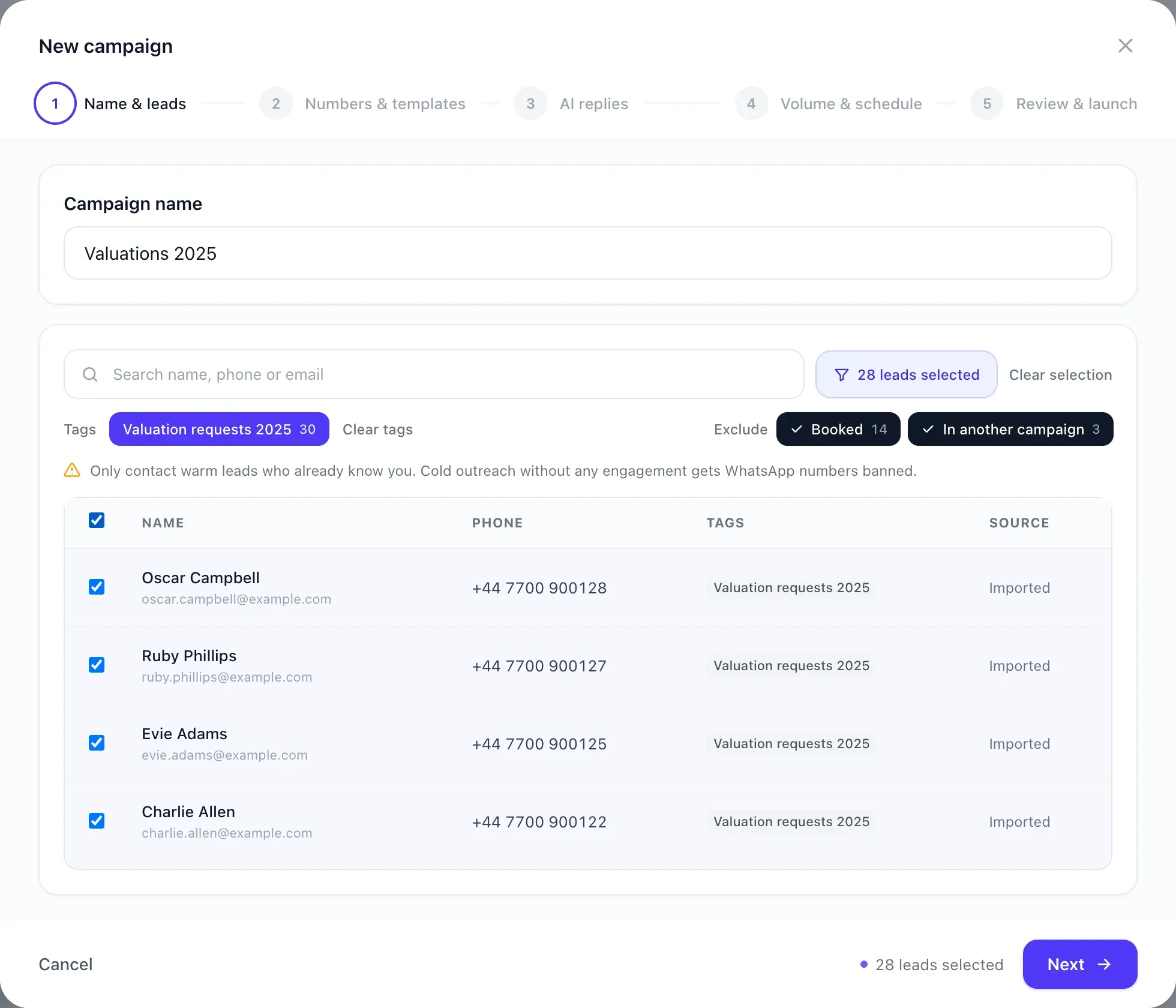
    Under Outbound, click "New campaign". Give it a name, filter by the import tag and select all matching leads with one click.

    • Leads who already booked are excluded automatically
    • So are leads in other running campaigns
    SetterMaxer campaign wizard, name and leads step: 30 leads tagged Valuation requests 2025 selected
    Choose leads: filter by tag, select all, done.
  3. Step 3

    Pick a number and a WhatsApp template

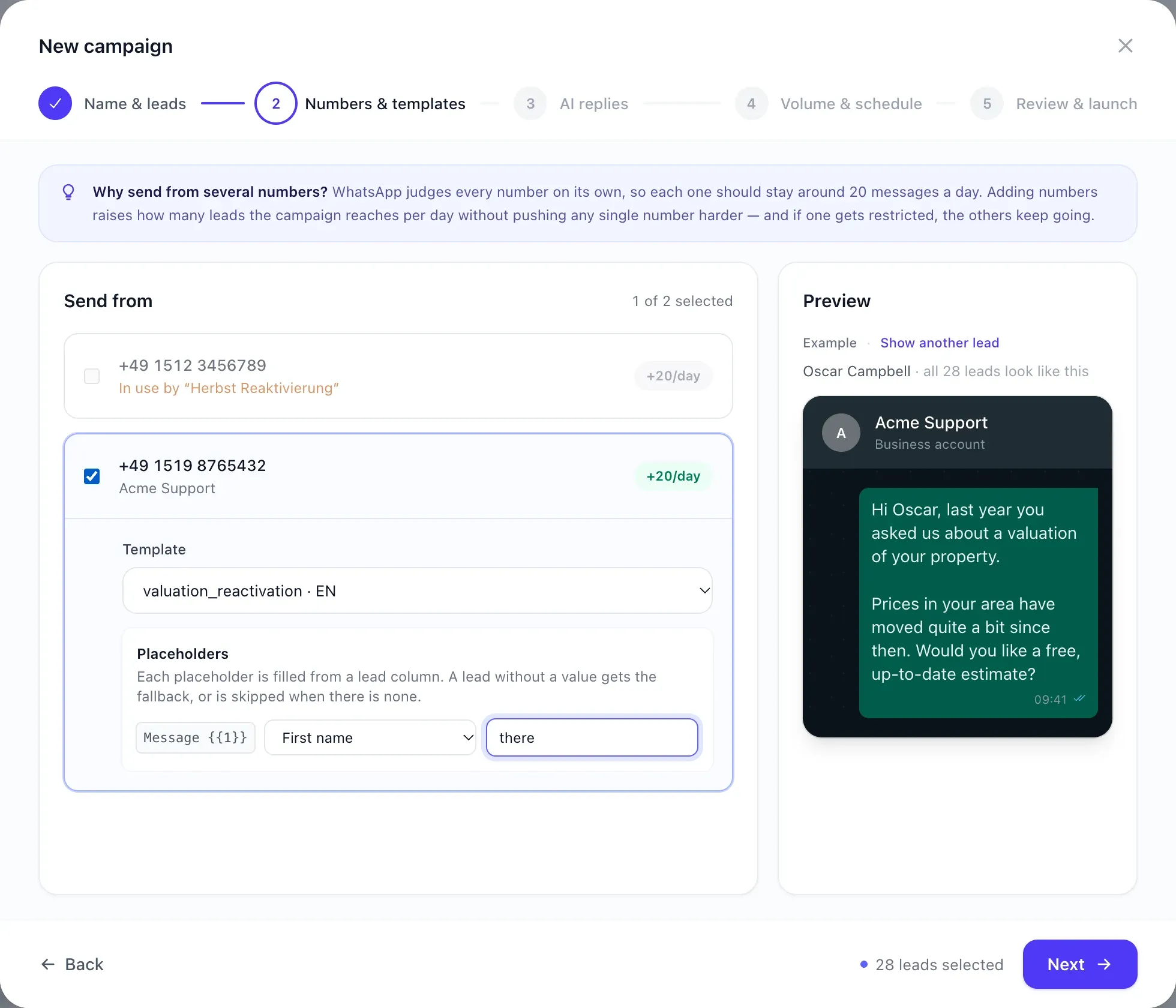
    Choose which WhatsApp number sends the messages and pick an approved template. Placeholders such as the first name are filled in from your list. The preview shows exactly what your lead will receive.

    • Use several numbers, each with its own template
    • Fallback value in case a first name is missing
    Choosing the WhatsApp number and template with a live preview of the personalized WhatsApp message to Ella
    Pick a template: the preview shows the real message.
  4. Step 4

    Give the AI agent some context

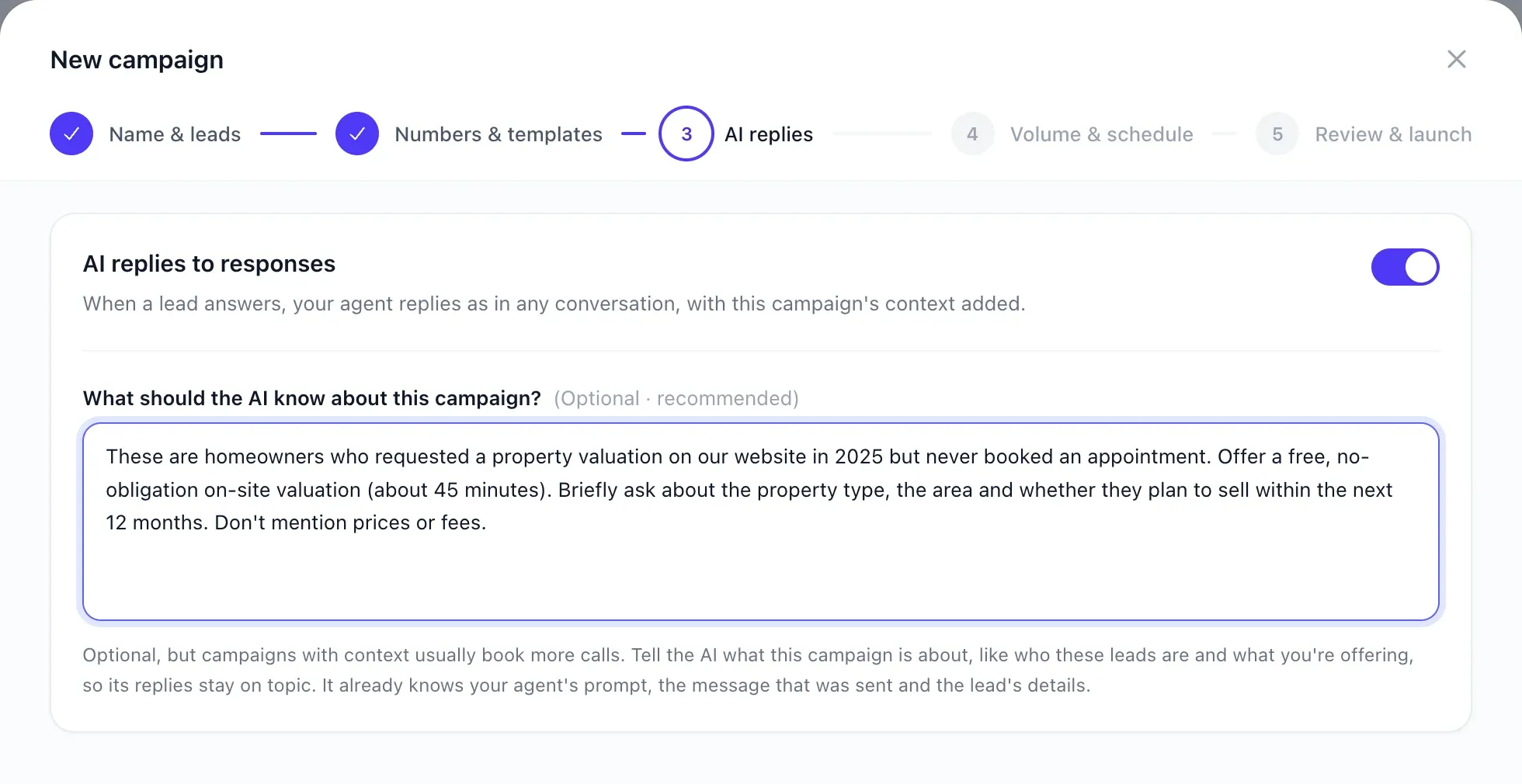
    Describe in two or three sentences who these leads are and what you're offering them. Your agent uses this in every conversation, so it stays on topic and knows which appointment it's aiming for.

    • AI replies can be switched on or off per campaign
    Context field for the AI agent describing the leads and the offer of a free on-site valuation
    AI context: who are the leads, and what's the offer?
  5. Step 5

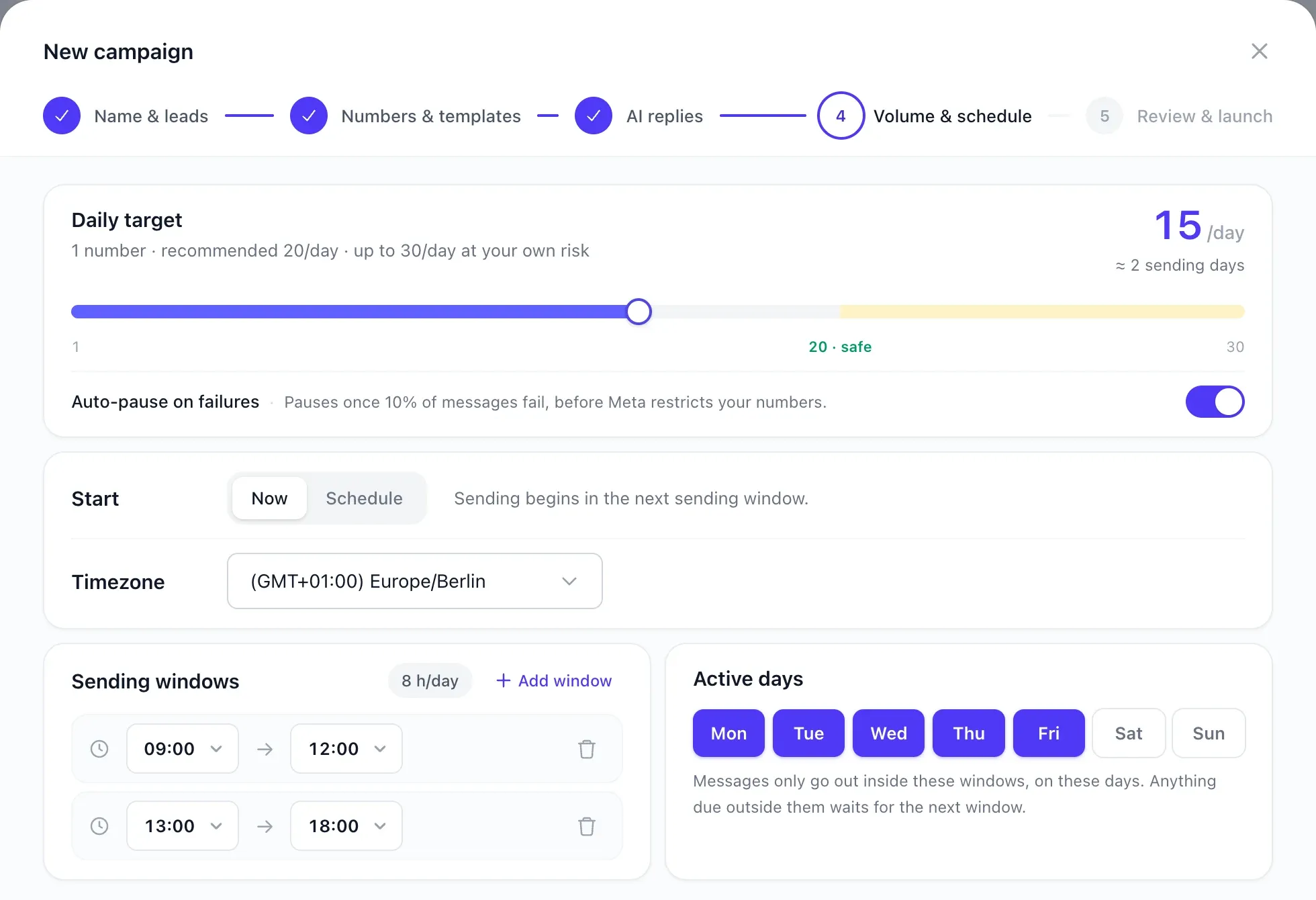
    Set the volume and schedule

    Decide how many messages go out per day, at what times and on which days. SetterMaxer spreads the messages out automatically to keep your number healthy. Then check the summary with the duration and estimated costs, and launch the campaign with one click.

    • Recommended: about 20 messages per number per day
    • Automatic pause if too many messages fail
    WhatsApp campaign schedule: daily target of 15 messages, sending windows 9 to 12 and 1 to 6 pm, Monday to Friday
    Schedule: sending windows and daily target in one view.
Live

Sit back: SetterMaxer takes over

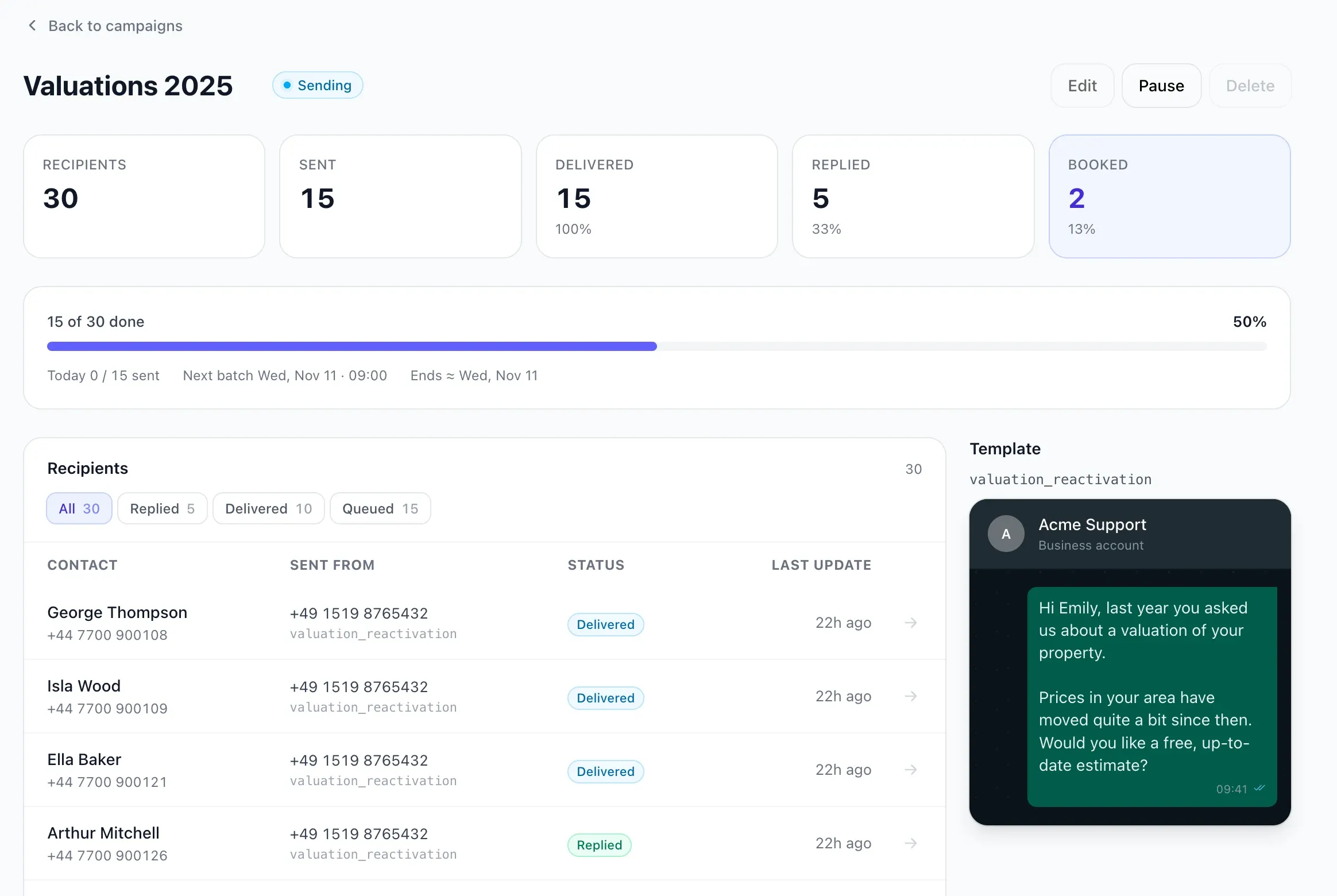
From here on, everything runs on its own. SetterMaxer messages your leads, the AI agent replies to every response, and booked appointments land in your calendar. The campaign dashboard shows at any time how many leads have replied and booked.

  • Sent, delivered, replied, booked
  • Every conversation in your inbox
  • Pause or adjust at any time
SetterMaxer campaign dashboard showing sent, delivered, replied and booked leads
Dashboard of a test campaign with sample data.
Practical tips

3 tips for more appointments from old leads

  1. Pick up where the last inquiry left off

    Mention what it was about back then, such as the property valuation or the free trial. A message that connects to something familiar gets answered. A generic blast doesn't.

  2. Offer a small, concrete next step

    A free estimate or a 15-minute call works better than "Let me know if you're interested". The easier it is to reply, the more conversations you start.

  3. Only message leads who know you

    Warm contacts who reached out before are far more likely to reply, and your WhatsApp number stays healthy. Start with a small list and scale up once the replies look good.

No WhatsApp number yet? Rent one directly from SetterMaxer
● System answers

Frequently asked questions about lead reactivation

Everything you need to know about WhatsApp campaigns, templates and costs.

What is lead reactivation?+

Lead reactivation means reaching out again to contacts who were interested in your offer at some point but never bought or booked, such as old website inquiries, trade show contacts or webinar attendees. The goal is to turn these dormant leads back into conversations and appointments.

Why WhatsApp instead of email?+

A WhatsApp message lands right on the phone, between messages from friends and family, not in an overflowing inbox. Instead of a click, a short reply is all it takes. That instantly becomes a conversation the AI agent carries on.

What is a WhatsApp template?+

With the WhatsApp Business API, businesses can only start a conversation with a template reviewed by Meta. You create the template once in SetterMaxer. The review usually takes just a few minutes, sometimes up to 24 hours. Placeholders such as the first name are filled in for every lead automatically. Once the lead replies, you can write freely.

How much does a WhatsApp campaign cost?+

Campaigns are included in every SetterMaxer plan, and each newly contacted lead counts toward your monthly lead allowance. Meta also charges a fee for the first template message, which varies by country. SetterMaxer shows you the estimated costs before you launch. Replies within 24 hours are free.

How many leads can I message at once?+

A campaign can include up to 1,000 leads. To keep your number healthy, SetterMaxer spreads the messages over several days. About 20 messages per number per day is recommended, so with several numbers it goes faster.

What happens if a lead doesn't reply?+

Nothing else happens. SetterMaxer doesn't send reminder sequences. Anyone who replies gets an instant answer from the AI agent. Anyone who doesn't reply won't be messaged again.

Can I message new leads on WhatsApp automatically too?+

Yes. Automatic Contact messages new leads that arrive by email, Zapier or API on WhatsApp a few minutes after they come in. That way new inquiries never pile up in the first place.

Guide: email leads on WhatsApp →
Can I take over conversations myself?+

Yes. All replies land in your conversations, and you can step in at any time. You can also switch off AI replies for a campaign entirely, so your team answers instead.

Inbound and outbound coverage is ready

Your old leads are waiting. Win them back.

Upload your list and launch your first WhatsApp campaign. Or book a free demo to see what lead reactivation looks like for your business.

Book a free demo