
WhatsApp Business API pricing explained: Meta's fees and message templates
What a WhatsApp Business API message costs in 2026: Meta's per-message fees by category and country, the free messages, and how templates work.
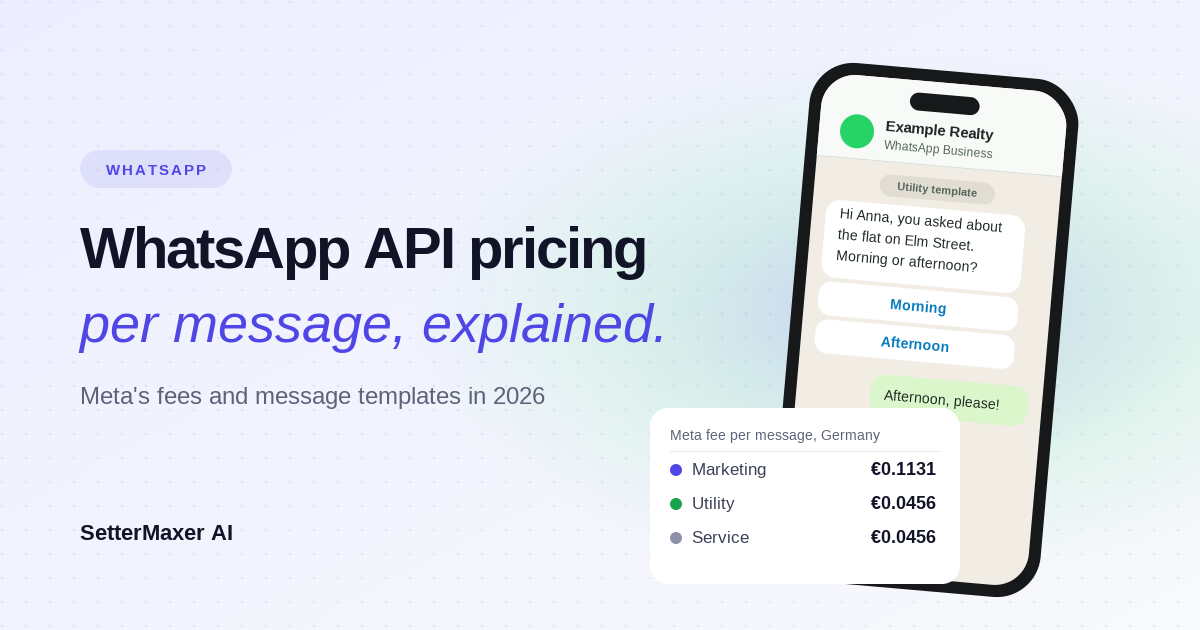
Meta charges for the WhatsApp Business API per delivered message. The price depends on two things: the category of the message (marketing, utility, authentication or service) and the country code of the recipient’s phone number. In Germany, a marketing message costs €0.1131 and a utility, authentication or service message €0.0456 at Meta’s list rates effective October 1, 2026 (Meta for Developers: Pricing).
This guide explains how these fees add up, which messages are free, and how message templates work, because templates decide the category and therefore the price. It covers the WhatsApp Business Platform (Cloud API). The WhatsApp Business app is a different product with no per-message fees.
Key takeaways
- Per message, not per conversation: Since July 1, 2025, Meta charges each delivered message. The old 24-hour conversation fee no longer exists.
- Category and country set the price: In Germany, marketing costs €0.1131 per message; utility, authentication and service cost €0.0456 each. In North America, they cost €0.0207 and €0.0028.
- Service replies are no longer fully free: Since October 1, 2026, each business phone number gets 1,000 free service messages a month. From the 1,001st, Meta charges the service rate.
- Some messages stay free: Messages users send you cost nothing, and after a click-to-WhatsApp ad, all your messages are free for up to 7 days.
- Templates are required outside the 24-hour window: You need an approved template to start a conversation or to write after 24 hours of silence. Its category (marketing, utility or authentication) decides what you pay.
How WhatsApp Business API pricing works in 2026
Meta charges a fixed rate for every message your business sends that reaches the recipient. Three rules from Meta’s pricing page shape every bill (Meta for Developers: Pricing):
- Only delivered messages count. A message that never reaches the phone costs nothing.
- The rate depends on category and market. The market is the recipient’s country calling code. 39 countries have their own rate; the rest fall into regions such as “Rest of Western Europe” (including Austria and Switzerland) or “North America” (US and Canada).
- Rates change at most four times a year, on January 1, April 1, July 1 or October 1, with advance notice.
Meta also charges nothing for messages users send to your business. You pay for what you send, not for what you receive.
What happened to conversation-based pricing?
Until June 30, 2025, Meta charged per 24-hour conversation: the first template message opened a conversation, and every message in the following 24 hours was included in one fee. Since July 1, 2025, Meta charges per message instead. Many guides and price calculators still describe conversation fees. If a source mentions “conversation categories” or “1,000 free conversations”, it describes the old model.
WhatsApp API rates per message by country
The table shows Meta’s list rates in euros for selected markets. They apply to the first messages of each month; utility and authentication get cheaper at high volume (see volume tiers).
| Market | Marketing | Utility | Authentication | Service |
|---|---|---|---|---|
| Germany | €0.1131 | €0.0456 | €0.0456 | €0.0456 |
| Netherlands | €0.1323 | €0.0414 | €0.0414 | €0.0414 |
| France | €0.0712 | €0.0248 | €0.0248 | €0.0248 |
| Italy | €0.0658 | €0.0248 | €0.0248 | €0.0248 |
| Spain | €0.0585 | €0.0166 | €0.0166 | €0.0166 |
| United Kingdom | €0.0526 | €0.0182 | €0.0182 | €0.0182 |
| Rest of Western Europe (e.g. Austria, Switzerland) | €0.0490 | €0.0142 | €0.0142 | €0.0142 |
| North America (US, Canada) | €0.0207 | €0.0028 | €0.0028 | €0.0028 |
Source: Meta, “Cost per message in EUR on the WhatsApp Business Platform, effective October 1, 2026” (rate cards on Meta for Developers). In US dollars, Germany costs $0.1365 for marketing and $0.0550 for the other three categories.
Two things stand out. First, Germany is one of the most expensive markets in Europe: a marketing message costs about twice as much as in Spain and more than twice as much as in the UK. Second, the gap between categories is large everywhere. In Germany, one marketing message costs about as much as 2.5 utility messages. Choosing the right template category is therefore the biggest lever on your bill.
What counts is the recipient’s number, not your location. A German business that messages a lead with a +43 number pays the Austrian rate (“Rest of Western Europe”).
Which WhatsApp messages are free?
Meta names two cases in which it does not charge your messages, on top of messages from users, which are always free (Meta for Developers: Pricing):
- The free entry point window. When someone messages you from a click-to-WhatsApp ad on the Android or iOS app and you reply within 24 hours, a free window opens. It can stay open for up to 7 days, and during that time Meta charges none of your marketing, utility, authentication or service messages.
- The first 1,000 service messages each month. Every business phone number gets 1,000 free service messages per month. They don’t roll over. From the 1,001st service message, Meta charges the service rate.
Before October 1, 2026, all service messages were free, and so were utility templates sent in an open customer service window. Meta resumed charging for both on that date. If you read that “replies within 24 hours are free”, that is only true for the first 1,000 service messages per number and month.
What is the 24-hour customer service window?
When a WhatsApp user messages or calls you, a 24-hour customer service window opens. Every new message from them resets the timer to 24 hours. While the window is open, you may send any message: free text, images, voice messages or documents. These free-form replies are service messages. Once the window has closed, you may only send approved template messages (Meta for Developers: Send messages).
The window explains why the same lead can cost very different amounts:
- The lead writes first, for example through a WhatsApp link on your website: you reply in the open window with service messages, and the first 1,000 of them each month are free.
- You write first, for example after a form enquiry: you need a template, and Meta charges its category’s rate.
- The lead goes quiet for more than 24 hours: every follow-up needs a template again.
How do WhatsApp message templates work?
A message template is a message format that Meta reviews and approves before you can use it. Templates are the only messages you can send outside a customer service window (Meta for Developers: Templates overview). You create a template once and reuse it, with variables for the parts that change.
What a template consists of
A template has up to four components (Meta for Developers: Template components):
- Header (optional): text of up to 60 characters, or an image, video, GIF or document.
- Body (required): the actual message, up to 1,024 characters.
- Footer (optional): up to 60 characters of plain text, for example an opt-out note.
- Buttons (optional): up to 10, such as quick replies, a link or a phone number. Button labels have up to 25 characters.
Variables are placeholders in double curly brackets. They can be named, such as {{first_name}}, or numbered, such as {{1}}. You have to add an example value for each one when you create the template. A utility template for a property enquiry could look like this:
Hi {{first_name}}, this is Example Realty. You asked about the flat
on {{street}} on our website. Would a viewing in the morning or the
afternoon suit you better?

[Morning]  [Afternoon]
Template categories decide the price
Every template has one of three categories (Meta for Developers: Template categorization):
- Utility: relates to a specific transaction or request, such as confirming or reminding of a booked appointment or answering an enquiry the user started.
- Marketing: everything promotional, including offers, newsletters and re-engagement of old contacts. As soon as a utility message contains an offer, it counts as marketing.
- Authentication: one-time passwords for logins or verification.
What counts is the content, not the label you choose. Meta checks the category during review and assigns marketing to promotional templates submitted as utility. Repeatedly picking the wrong category can lead to restrictions; our guide on protecting your WhatsApp Business number from a ban explains the rules in detail.
Review, statuses and limits
Templates are reviewed automatically when you create or edit them, and the review can take up to 24 hours. Only templates with the status “Approved” (in WhatsApp Manager “Active”) can be sent. Templates can also be rejected, or later paused or disabled if recipients react badly; paused and disabled templates can’t be sent (Meta for Developers: Templates overview).
A few limits matter in practice:
- Number of templates: 250 per WhatsApp Business account if your business portfolio is unverified, up to 6,000 once it is verified and a number has an approved display name.
- Languages: each language version is a separate template and counts toward the limit. Meta does not translate templates.
- Approval is not consent: Meta checks the text, not your contact list. You may only message people who have opted in.
Volume tiers: discounts for high volume
Utility and authentication messages get cheaper as your monthly volume in a market grows. Marketing and service messages have no volume tiers. Tiers count all charged messages of your business portfolio per market and category and reset every month; free messages don’t count (Meta for Developers: Pricing).
For utility messages to Germany, Meta’s EUR rate card starts with these tiers:
| Utility messages to Germany per month | Rate per message |
|---|---|
| 1 to 100,000 | €0.0456 (list rate) |
| 100,001 to 1,000,000 | €0.0433 (-5%) |
| 1,000,001 to 4,500,000 | €0.0410 (-10%) |
| 4,500,001 to 40,000,000 | €0.0388 (-15%) |
For authentication to Germany, the first discount starts at the 300,001st message. Each tier rate only applies to the messages within that tier. For most small and mid-sized businesses, the list rate is the price that counts.
Example: what 200 leads a month cost on WhatsApp
Let’s say an estate agent in Germany receives 200 web enquiries a month and replies on WhatsApp from one business number. Using the German list rates:
| Messages | Count | Category | Cost |
|---|---|---|---|
| First message after the enquiry (template) | 200 | Utility | €9.12 |
| Replies in open chats (10 per lead on average) | 2,000 | Service, 1,000 free | €45.60 |
| Reminder the day before the viewing (template) | 80 | Utility | €3.65 |
| Total Meta fees | €58.37 |
If the first message were a marketing template instead, for example because it advertises a free valuation, it would cost €22.62 instead of €9.12. The example also shows where the October 2026 change hurts most: in active conversations. A team that replies with many short messages pays more than one that answers in fewer, complete messages.
These are Meta’s fees only. Your WhatsApp provider or software comes on top.
How to lower your WhatsApp API costs
- Let leads write first. A WhatsApp button on your website, in your email signature or in a click-to-WhatsApp ad opens the customer service window without a template. After an ad, the next 7 days are completely free.
- Use utility where the content allows it. A factual reply to an enquiry or an appointment reminder is utility. Don’t hide offers in it: Meta will reclassify the template as marketing.
- Reply in fewer, complete messages. Since October 2026, every service message beyond the free 1,000 costs the service rate. One clear answer is cheaper than three fragments.
- Reply quickly. If you answer while the window is open, you don’t need a template to restart the conversation.
- Don’t send templates to contacts who don’t expect them. Besides the fee, you risk blocks and a lower quality rating.
- Check where your leads come from. A campaign to numbers in the US costs a fraction of the same campaign to German numbers.
Who bills the WhatsApp fees?
Meta bills the message fees to the payment method of your WhatsApp Business account, in the currency you choose for the account. Meta supports 16 currencies, and you can’t change the currency once you’ve selected it (Meta for Developers: Pricing). Without a payment method, Meta still delivers service messages within the free tier, but no charged messages. Some providers (Business Solution Providers) pay Meta on your behalf and invoice you instead, sometimes with a mark-up, so check whether a quote is at Meta’s rates or the provider’s.
What SetterMaxer costs on top of Meta’s fees
SetterMaxer uses the official WhatsApp Business API. Meta bills the message fees directly to your WhatsApp Business account, not through SetterMaxer, so you pay Meta’s list rates without a mark-up. SetterMaxer itself costs a fixed monthly price by lead volume, from the free plan up to €499 a month (see pricing). If you don’t want to use your own number, you can rent one for €15 per month (WhatsApp number add-on).
- Replies in the open window: When a lead writes, the AI WhatsApp chatbot answers within seconds while the 24-hour window is open, qualifies the lead and books the appointment.
- Templates only where they’re needed: For first contact and follow-ups after the window closes, SetterMaxer uses your approved templates.
- Cost estimate before every campaign: Before you reactivate old leads, SetterMaxer shows Meta’s estimated fees, based on each lead’s country and the template category.
Frequently asked questions
How much does a WhatsApp Business API message cost in Germany?
At Meta’s list rates effective October 1, 2026, a marketing message to a German number costs €0.1131 ($0.1365). Utility, authentication and service messages each cost €0.0456 ($0.0550). Utility and authentication get cheaper above 100,000 and 300,000 messages a month respectively.
Are incoming WhatsApp messages free?
Yes. Meta doesn’t charge for messages users send to your business. You only pay for messages your business sends, and only if they are delivered.
Is the WhatsApp Business app free?
Yes, the WhatsApp Business app has no per-message fees. Meta’s per-message pricing only applies to the WhatsApp Business Platform (API), which you need for automation, CRM integrations or an AI chatbot.
Does every message need a template?
No. Within 24 hours of the user’s last message, you can write freely. You only need an approved template to start a conversation or to write after the window has closed. You create each template once and reuse it.
How long does template approval take?
Meta reviews templates automatically when you create or edit them. According to Meta, the review can take up to 24 hours.
Sources
All pages retrieved on November 22, 2026.
- Meta for Developers: Pricing on the WhatsApp Business Platform, including the EUR and USD rate cards and volume tiers effective October 1, 2026
- Meta for Developers: Send messages and the customer service window
- Meta for Developers: Templates overview
- Meta for Developers: Template components
- Meta for Developers: Template categorization
Your AI setter on WhatsApp
SetterMaxer replies to every enquiry within seconds, qualifies against your criteria and books the right leads into your calendar.